Tiered pricing support for quotes
❗ Important: This feature is currently in Early Availability (EA) status.
This release introduces tiered pricing support in the quoting system, enabling quotes to automatically calculate pricing across configured quantity tiers. For eligible product editions, the quote now shows how units are distributed by tier, the unit price for each tier, each tier subtotal, and the overall total, while non-tiered editions continue to behave as they do today.
Key highlights
- Resellers and internal sales users can now generate accurate quotes for editions with configured tiered pricing without needing to calculate tier thresholds manually.
- As quoted quantities increase and cross pricing thresholds, the system automatically applies the correct tier prices and recalculates totals in real time.
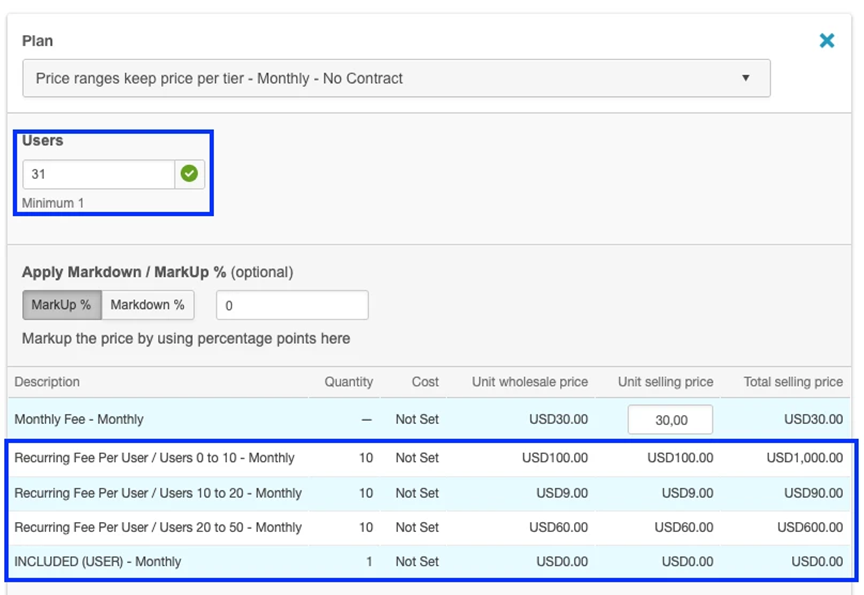
- Quotes now provide clearer pricing visibility by displaying the quantity allocation across tiers, the per-tier unit price, the per-tier subtotal, and the final total.
- This applies only to editions with tiered pricing configured in the catalog; non-tiered editions remain unchanged. Existing saved quotes are not impacted. New quotes, or edited quotes for tiered editions, use the updated pricing logic.
- The calculation logic uses cumulative per-tier subtotals to derive the overall total.
What’s included
- Tiered pricing support for quotes created or edited for product editions with configured pricing tiers.
- Automatic allocation of entered units across applicable pricing tiers.
- Display of per-tier pricing details and recalculated totals within the quote.
What remains unchanged
- Quotes for non-tiered editions continue to be calculated exactly as before.
- Existing workflows remain intact aside from the updated pricing logic and display for eligible editions.
UI updates
Location: Quotes > Create and Edit
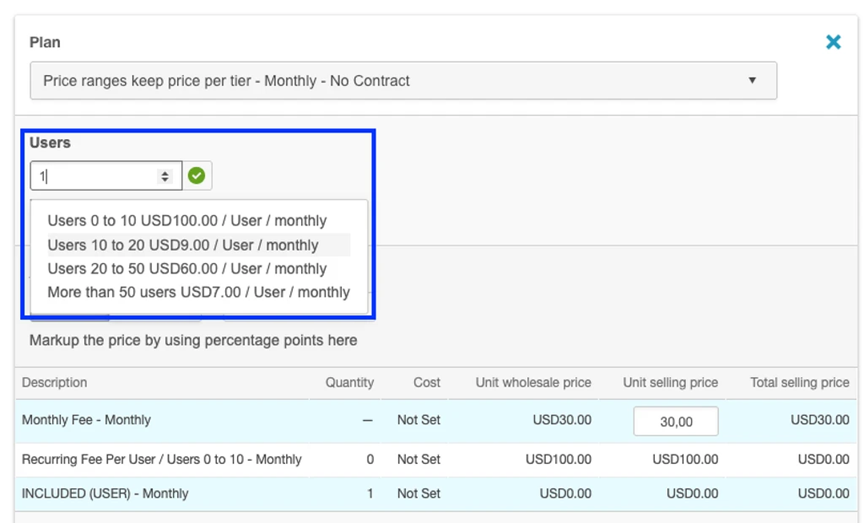
For eligible editions, the pricing section now includes:
- A tier breakdown table
- Per-tier unit price
- Per-tier subtotal
- Recalculated grand total as quantity changes
📝 Note: There are no changes to keyboard behavior or ARIA behavior.
Feature enablement
This feature is not enabled by default. Contact your AppDirect technical representative to request it.
Setting enablement
No setting enablement is required.
Documentation
No documentation updates are required.
Was this page helpful?
Tell us more…
Help us improve our content. Responses are anonymous.
Thanks
We appreciate your feedback!